

Mobile Point of Sale (MPOS), is as it sounds, having components portable. There are in general two main categories.
Totally MPOS, having all components portable. Think of carrying your full EPOS functionality with you including card payment and printing.
MPOS with Base Station, the ability to take the tablet head from the EPOS unit and walk about with it, but still printing from the main base station unit.
There are no limitations to the Register EPOS software when used in an MPOS configurations and the solution can work offline.
Totally MPOS
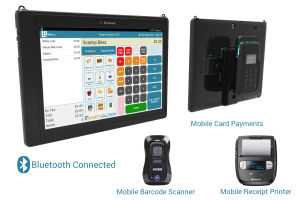
Totally Mobile Point of Sale is having the ability to take your POS anywhere. This set up could be used in or out of the store on the road or at an exhibition for example. The devices are connected together via Bluetooth and they can communicate to the internet via WI-FI for a store type environment or cellular data (e.g. 3G,5G) for an out of store environment.
For an out of store cellular environment the tablet will ether need a cellular SIM, or be connected to a mobile phone with data, or a MiFI unit.
Totally MPOS hardware options
There are many options for a totally mobile environment. If you need assistance, please contact your service provider to discuss your requirements.
Tablet and Enclosure

You will need an Android tablet from our supported tablet tablets list. (Note: the Oxhoo Zenio is not appropriate in this case as it has a fixed stand.)
You can purchase any type of rugged case for the tablet, however you might want to consider a case that also holds the card payment device. Such as the Unique Secure MePOS mobile unit. The advantage of this also is that it can be used with or upgraded to the MePOS Pro platform. In addition, there is a charging dock that can charge the tablet and payment device simultaneously.
Card Payment & Cash
You can still take and record cash management in a mobile environment just as you would in store. You will need to consider how cash is stored, for instance in a mobile cash box or cash belt.
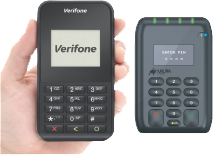
Card payment is typically provided by a mobile, smaller than average and Bluetooth enabled device such as the Miura M10 or Verifone E355. This could either be stored in your pocket, on a belt or attached to the back of the tablet as with the MePOS mobile unit above. Obviously having them attached means less things to think about and carry separate and there is a there is a charging dock that can charge the tablet and payment device simultaneously.
Mobile Printers
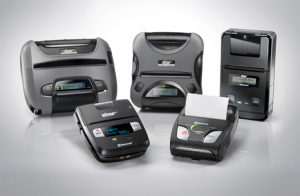
Register supports the Star range and any ESCPOS mobile printer. There are options for receipt width, labels printing and connectivity. See examples below.
Totally MPOS Barcode Scanners
For mobile barcode scanning you will need a wireless Bluetooth enabled scanner. Any scanner that supports the SPP (Serial Packet Protocol) protocol should operate fine. However, we would recommend you use one of the certified options below.
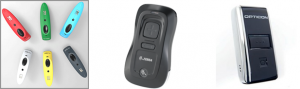
Socket CHS7 | Zebra CS3000 | Opticon OPN-2006
If your scanner is not listed here and it supports Bluetooth & SPP, please contact us to discuss it being tested and added to the certified list. If you are purchasing a scanner, please purchase one that is pre-certified as above.
MPOS with Base Station
MPOS with a base station is typically used in a in store environment. This allows mobility in the store. In this case, the tablet is connected to a fixed base unit with a printer and payment. You would use this to clientele with your customer and enter goods into the EPOS as you walk around the store with the customer. Then go back to the base station to de-tag garments and take payments. This set up has the advantage that you have two modes of operation. One as a regular fixed EPOS solution and two as a Tablet MPOS solution.
MPOS with Base Station Hardware options
There are two main options for this set up, one is an all-in-one integrated platform where the tablet can be removed and it portable and the other is a separates-based solution.
Integrated all-in-one platform
For detailed overview information on Integrated all-in-one platforms see – Integrated all-in-one-platforms.
Unique Secure MePOS Pro
The MePos has been specifically designed to allow the tablet head to be removed and the payment device connected to the tablet casing as shown the in the picture. The tablet and base connect via Wi-FI, so the range is as good as your Wi-FI coverage. This is a good solution for moving from fixed to mobile rapidly and often.
Star mPOP
With the standard Star mPOP set up, the tablet is resting on the base with the power cord plugged in. The tablet connects to the base via Bluetooth. To use it in a mobile way, you just need to unplug the power and pick up the tablet. The range of connection is limited to Bluetooth which it typically in the order of 10M. If you purchase the more rugged Star POPPack tablet holder, this is not suitable for mobile use.
Miura POSzle
The tablet on the POSzle can be removed via raising the top clip of the tablet holder and removing the power cable. The tablet connects to the base via Bluetooth. The range of connection is limited to Bluetooth which it typically in the order of 10M.
Separates
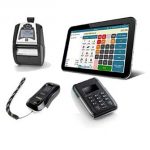
Please see the separates section for a detailed overview. If you choose a tablet holder where the tablet can be unclipped with a wireless barcode reader then this can be used on a mobile way. You can take the tablet and barcode reader around the store. If the tablet and printer are connected over WI-Fi this will have the range of your Wi-Fi network, back to the printer. Note as the barcode reader will connect to the tablet over Bluetooth and you take both with you, range for the barcode reader is not an issue.
